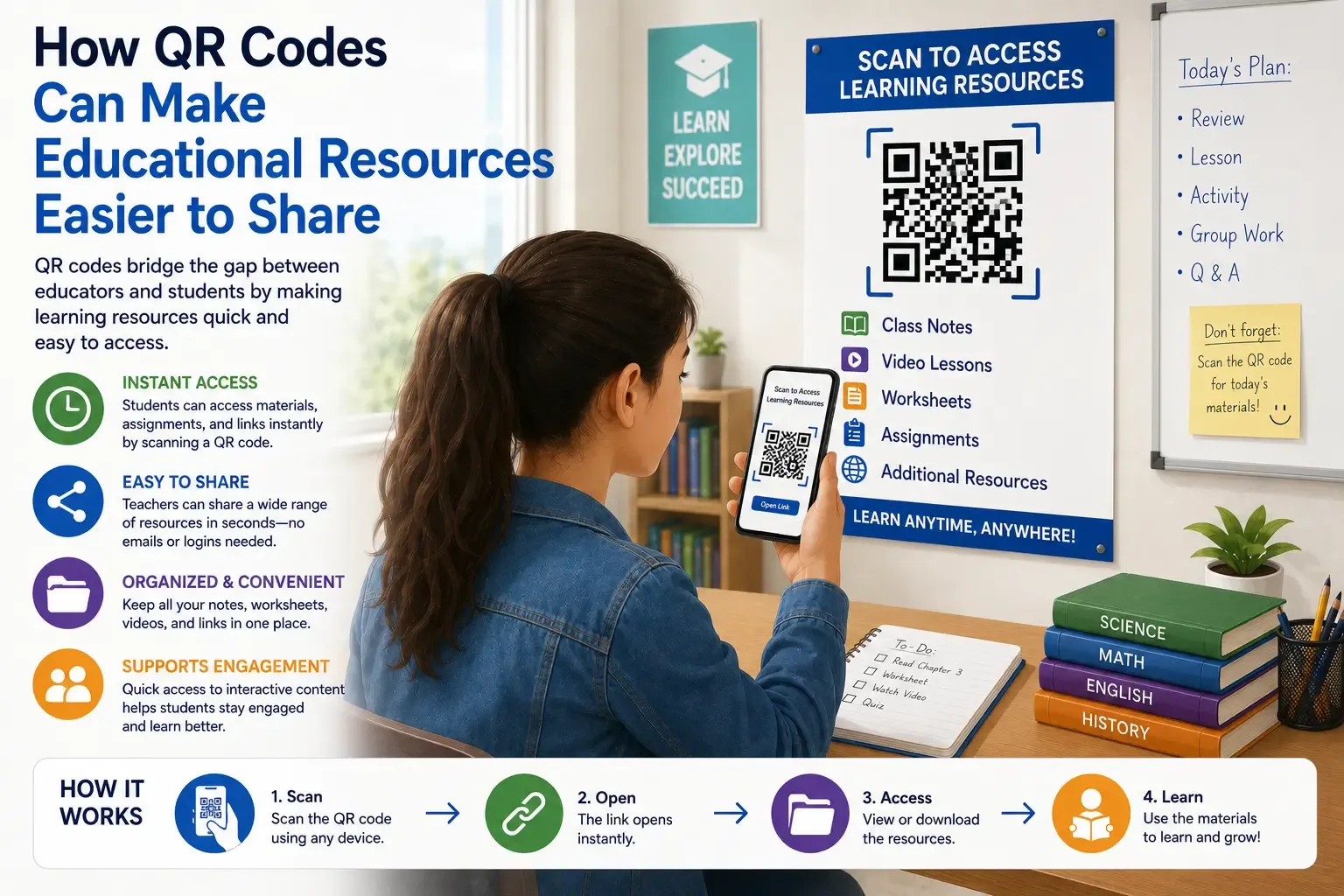

Teachers now have more digital learning materials available than ever before.
Videos, downloadable worksheets, online quizzes, presentations, audio lessons, and interactive activities can all support classroom learning. The problem is that students do not always know where to find them.
A useful resource may be hidden inside a shared folder, buried within a learning platform, or connected to a web address that is difficult to type.
QR codes can provide a simple solution.
By adding a scannable code to a worksheet, poster, presentation, textbook page, or classroom display, educators can send students directly to the correct online resource.
This makes QR codes in education useful for sharing assignments, study materials, videos, instructions, and other learning content.
How QR Codes Work in Education
A QR code stores information that can be read by a smartphone or tablet camera.
In most educational situations, the code contains a link. When students scan it, their device opens the connected webpage, document, video, or activity.
A QR code can lead to:
- An assignment page
- A downloadable PDF
- A video tutorial
- An online quiz
- A presentation
- An audio recording
- A shared document
- A reading list
- A classroom calendar
- A feedback form
Instead of asking students to manually enter a complicated web address, teachers can provide direct access with one scan.
Making Learning Materials Easier to Find
Creating useful digital resources is only part of the teaching process. Students must also be able to locate those resources quickly.
Even a well-organized learning platform can require several steps:
- Open the platform.
- Sign in.
- Select the correct course.
- Find the correct topic.
- Open the required file.
A QR code can reduce this process by directing students to the exact destination.
This can be particularly helpful during lessons, when spending several minutes searching for a document can interrupt the flow of the activity.
The code acts as a shortcut between the student and the resource.
Linking Printed Worksheets to Online Content
Printed worksheets remain valuable because they are simple, familiar, and easy to use.
However, a printed page cannot play a video, provide an audio explanation, or display an interactive activity.
QR codes allow educators to combine printed and digital learning.
For example:
- A mathematics worksheet can link to a worked solution.
- A science activity can open an experiment demonstration.
- A language worksheet can include a pronunciation recording.
- A history lesson can connect to an interactive timeline.
- A geography activity can link to a virtual map.
- A reading exercise can open an author interview.
The main worksheet can remain focused while the QR code provides optional supporting material.
Students who need additional help can scan the code, while those who already understand the topic can continue working.
Sharing Assignments With One Scan
Assignments often include several resources.
Students may need a set of instructions, a reading document, a template, an example, and a submission form. When these items are shared separately, students may miss an important part of the task.
A QR code can link to one central page containing everything they need.
Teachers may place assignment QR codes on:
- Homework sheets
- Classroom posters
- Project instructions
- Course schedules
- Presentation slides
- Revision guides
- Printed calendars
Each code should include a clear description.
Useful labels include:
- Scan to open the assignment
- Scan to read the project instructions
- Scan to download the template
- Scan to submit your work
A label helps students understand what the code contains before they open it.
Providing Downloadable Study Materials
QR codes can also simplify the distribution of digital documents.
Educators can use them to share:
- Lesson notes
- PDF worksheets
- Presentations
- Reading lists
- Revision guides
- Project templates
- Classroom schedules
- Additional exercises
The process usually involves uploading the resource to an accessible online location and creating a QR code from its link.
A service such as QRColor can be used to create a QR code that connects students to an educational document, assignment, video, or webpage.
After creating the code, educators should test the entire experience.
The link should open correctly, the resource should work on mobile devices, and students should have permission to view it.
A code that leads to a restricted document will create more confusion rather than less.
Supporting Independent Learning
QR codes can help students find instructions and explanations without waiting for direct assistance.
For example, a code placed beside classroom equipment could open a setup guide. A code included in a workbook might provide a step-by-step explanation of a difficult topic.
QR codes can connect students with:
- Worked examples
- Recorded explanations
- Troubleshooting guides
- Safety instructions
- Additional practice
- Revision activities
- Translated materials
- Simplified directions
This can support students who work at different speeds.
Learners can review the resource as many times as necessary while the teacher continues helping the rest of the class.
Creating Interactive Learning Stations
QR codes can also be used to organize classroom stations and movement-based activities.
A teacher might place several codes around the room. Each one can open a different question, clue, instruction, video, or task.
This format can work well for:
- Revision stations
- Classroom scavenger hunts
- Vocabulary challenges
- Group projects
- Science investigations
- Orientation exercises
- Interactive stories
- Research activities
Students scan each code and complete the connected task before moving to the next station.
The QR codes make the activity easier to organize, but the learning objective should remain the main focus.
Codes should be included because they improve the activity, not simply because they make the lesson appear more technical.
Sharing Video and Audio Resources
Some subjects are easier to understand through multimedia.
A written description of pronunciation, movement, or a scientific process may not be as clear as an audio or video demonstration.
QR codes can link printed materials directly to:
- Tutorial videos
- Recorded lectures
- Audio lessons
- Demonstrations
- Interviews
- Music recordings
- Pronunciation exercises
- Captioned explanations
Students can open the material during the lesson or save it for later revision.
This is also useful for homework because the supporting resource remains attached to the assignment itself.
Quick Quizzes and Classroom Feedback
Teachers can use QR codes to direct students to online quizzes and feedback forms.
A code can be displayed on the board, added to a worksheet, or placed at the end of a presentation.
Students scan it to open:
- A short knowledge check
- An exit ticket
- A lesson reflection
- A homework quiz
- A classroom survey
- A peer-review form
- A course evaluation
This eliminates the need to explain where the form is stored or ask students to search for it.
Digital responses can also help teachers identify common mistakes and topics that may need further explanation.
Improving Communication With Families
QR codes can be useful outside the classroom as well.
Schools often send printed notices containing event details, permission forms, calendars, and other information. Adding a QR code can give parents and guardians direct access to the related online page.
A school notice might include a code linking to:
- An event registration form
- A school calendar
- A newsletter
- A permission form
- A parent guide
- A contact page
- A translated notice
- A list of classroom materials
The most important information should still appear in the printed notice.
The QR code should provide convenient access to additional details rather than replacing all written information.
Enhancing School Libraries and Displays
QR codes can add digital content to library shelves, classroom exhibitions, and student projects.
A code placed beside a book could open:
- An author interview
- A student review
- A reading guide
- A list of similar books
A QR code included in a school display could link to:
- A video presentation
- Research sources
- Additional photographs
- A digital portfolio
- A detailed explanation of the project
This allows visitors to explore the topic more deeply without overcrowding the physical display.
Static and Dynamic QR Codes
Educators may choose between static and dynamic QR codes depending on how the resource will be used.
Static QR codes
A static QR code permanently contains its original destination.
It may be suitable for:
- One-time assignments
- Permanent school pages
- Fixed reference materials
- Documents that will not move
If the link changes, the QR code usually needs to be replaced.
Dynamic QR codes
A dynamic QR code generally allows the destination to be updated after the code has been printed.
This can be useful for:
- Reusable classroom posters
- Weekly assignments
- Changing reading lists
- School noticeboards
- Materials used during multiple courses
- Resources updated each term
A dynamic code may reduce the need to print new materials whenever the linked content changes.
How to Make Educational QR Codes Easy to Scan
The success of a QR code depends on more than the link it contains.
The code must also be displayed clearly.
Use strong contrast
Dark QR code elements on a light background are usually the most reliable.
Custom colors may work, but the foreground and background need to remain clearly separated.
Leave empty space around the code
A QR code needs a clear margin around its edges.
Text, images, borders, and decorative elements should not touch the code.
Choose the correct size
A code printed on a worksheet can be relatively small because students will scan it from nearby.
A code displayed on a projector screen or classroom wall needs to be larger.
The farther away the scanner is, the larger the code should be.
Avoid damaged or reflective surfaces
Wrinkled paper, strong reflections, curved surfaces, and poor print quality can make a QR code difficult to read.
Place the code on a flat, visible surface whenever possible.
Always Explain What the QR Code Opens
Students should not need to guess where a QR code will lead.
A short call to action can make the purpose clear.
Examples include:
- Scan to watch the demonstration
- Scan to download the worksheet
- Scan to open the study guide
- Scan to complete the quiz
- Scan to view the assignment
Clear descriptions can also make students feel more comfortable scanning the code because they know what to expect.
Test the Full Experience
Before distributing a QR code, educators should scan it exactly as a student would.
Check that:
- The code opens the intended resource
- The link works on a mobile device
- The text is readable on a small screen
- Students have access permission
- The page loads correctly
- No unnecessary account is required
- The resource has not been moved or deleted
Testing with more than one device can help reveal compatibility problems.
It is also worth checking printed codes after printing them. A code that works on a computer screen may become difficult to scan if it is printed too small or at low quality.
Offer Another Access Method
QR codes should make learning resources more accessible, but they should not become the only option.
Not every student has a personal smartphone or tablet. Some schools restrict phone use, and internet access may occasionally be unreliable.
Alternative access methods can include:
- A short web address
- A link inside the learning platform
- A classroom computer
- A school-owned device
- A printed copy
- Written instructions
Students should still be able to complete the activity when they cannot scan the QR code.
Privacy and Safety Considerations
A QR code placed in a classroom, hallway, library, or public display may be scanned by more people than expected.
Educators should avoid linking public codes to:
- Student records
- Private folders
- Personal contact information
- Confidential documents
- Files containing sensitive data
The destination should be suitable for the intended audience and follow the school’s privacy guidelines.
Students should also be reminded that a QR code is another form of web link.
They should scan codes only when the source is clear and trusted.
Common Problems to Avoid
Some of the most common educational QR code mistakes include:
- Linking to a private file
- Using a code that is too small
- Choosing colors with weak contrast
- Failing to test the destination
- Linking to a page that is difficult to use on mobile
- Moving the linked file after printing the code
- Providing no explanation beside the code
- Requiring unnecessary registrations
- Making scanning the only access option
Most of these problems can be prevented with a quick test before the material is shared.
Using QR Codes With a Clear Purpose
QR codes are not necessary for every lesson or every document.
They are most effective when they remove a genuine obstacle.
A QR code may be useful when it:
- Saves time
- Prevents typing errors
- Directs students to an exact resource
- Adds multimedia to printed material
- Supports independent learning
- Provides optional explanations
- Simplifies classroom activities
If a short sentence can communicate the same information more clearly, a QR code may not be needed.
The goal is not to place more technology in the classroom. The goal is to make learning materials easier to access.
Final Thoughts
QR codes in education can provide a simple connection between physical materials and digital learning resources.
Teachers can use them to share assignments, worksheets, study guides, quizzes, presentations, audio recordings, and video lessons.
They can also support independent learning, interactive classroom activities, parent communication, libraries, and student projects.
Their greatest advantage is convenience.
With one scan, students can move from a printed page to the exact digital resource they need.
When QR codes are clearly labeled, properly tested, easy to scan, privacy-conscious, and supported by another access option, they can become a practical part of everyday education.




























Sign in to leave a comment.