
Understanding the differences between resistive and capacitive touch screens is essential for anyone working with modern digital interfaces. Whether you’re designing industrial equipment or consumer electronics, knowing the strengths and limitations of each technology can guide you toward the best solution for your application.
In this article, we explore the basic principles behind touch screens, examine both resistive and capacitive systems, and discuss their advantages, drawbacks, and applications.
What Is a Touch Screen?
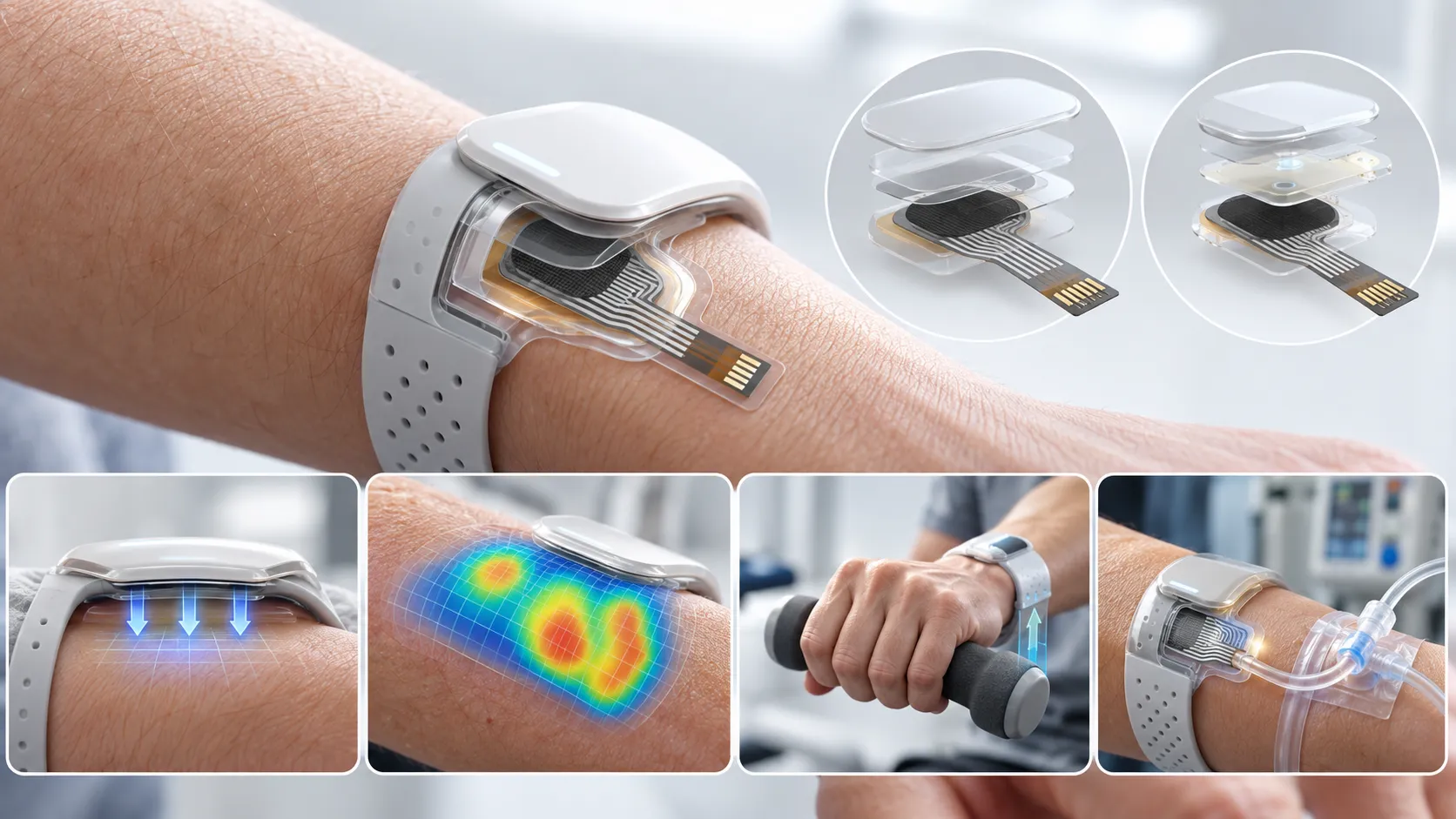
A touch screen is an electronic input device layered on top of a display that allows users to interact directly with what they see. Instead of relying on a keyboard or mouse, users can tap, swipe, or perform multi-touch gestures on the screen.
This direct form of interaction not only simplifies the user experience but also enables a more intuitive interface across a wide range of devices—from smartphones and tablets to industrial control panels and public kiosks.
Touch Screen Key Features and Materials
Modern touch screens are designed to be responsive, durable, and adaptable to various environments. They respond quickly to input and can be operated with a bare finger, gloved hand, or specialized stylus. Many are built to withstand harsh conditions including extreme temperatures, high humidity, and exposure to dust.
The construction of a touch screen typically involves two primary materials: films and glass. The films, often clear or anti-glare with a hard-coated finish, incorporate an indium tin oxide (ITO) coating to enable touch sensitivity. In contrast, glass layers—available in a range of thicknesses from 0.55mm to 3.0mm—offer better durability and, when chemically strengthened, improved resistance to impact. The choice between film and glass depends on factors such as cost, clarity, and the intended operating environment.

Applications of Touch Screen Technology
Touch screens have become ubiquitous due to their versatility. They are commonly found in industrial controls, public information kiosks, voting machines, and point-of-sale systems, as well as in consumer electronics and medical devices. The ability to provide a direct, user-friendly interface makes touch screens ideal for applications where ease of use and immediate feedback are paramount.
In industrial environments, touchscreen monitors enhance efficiency and productivity by streamlining operations and providing operators with real-time data. Their ability to deliver a direct, user-friendly interface makes them ideal for applications where ease of use and immediate feedback are paramount.
Resistive Touch Screens
What Is a Resistive Touch Screen?
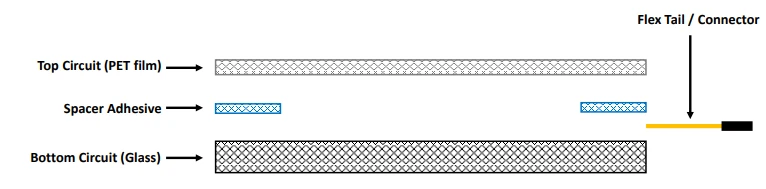
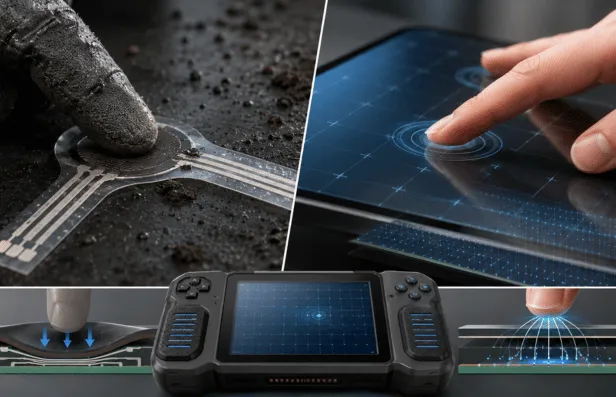
Resistive touch screens are one of the earliest and most cost-effective touch technologies. They consist of a flexible top layer—usually made of PET (polyethylene terephthalate)—and a bottom layer, which can be made of glass or PET film. These layers are separated by a thin adhesive with small spacer dots. When pressure is applied to the screen, the top layer is pressed into contact with the bottom layer, and the system detects the touch by measuring the change in voltage at the point of contact.
There are several variants within resistive technology. The traditional 4-wire design is favored for low-cost applications and industrial environments, while the 5-wire version offers improved durability by continuing to function even if the top layer is damaged. The 8-wire variant goes a step further by incorporating extra sensing lines to automatically correct any drift (electrical misalignment) over time.
Additionally, the matrix resistive configuration uses a grid of electrodes arranged in horizontal rows and vertical columns, which is particularly useful when distinct, finger-sized touch zones are needed.
Basic Function and Construction of Resistive Touch Screens
In a typical 4-wire resistive touch screen, a uniform voltage gradient is applied to the top layer. When a user presses the screen, the two layers make contact, and the controller measures the resulting voltage to determine the exact X and Y coordinates of the touch—all within a few milliseconds. The 5-wire design simplifies the process by placing all electrodes on the bottom layer, using the top layer merely as a probe to sense voltage changes. The 8-wire system, meanwhile, not only detects the touch coordinates but also adjusts for any drift, ensuring consistent performance over time.
Resistive screens are most commonly constructed using a film-to-glass approach. This method offers good transparency and cost-effectiveness and is widely used for screens up to about 21 inches. In some cases, a film-to-film construction is employed, which includes a rigid backer or stiffener to provide extra durability. Although this approach might sacrifice some clarity due to the additional layers, it proves invaluable in applications where the screen must endure heavy use or impact.
Advantages and Drawbacks of Resistive Touch Screens
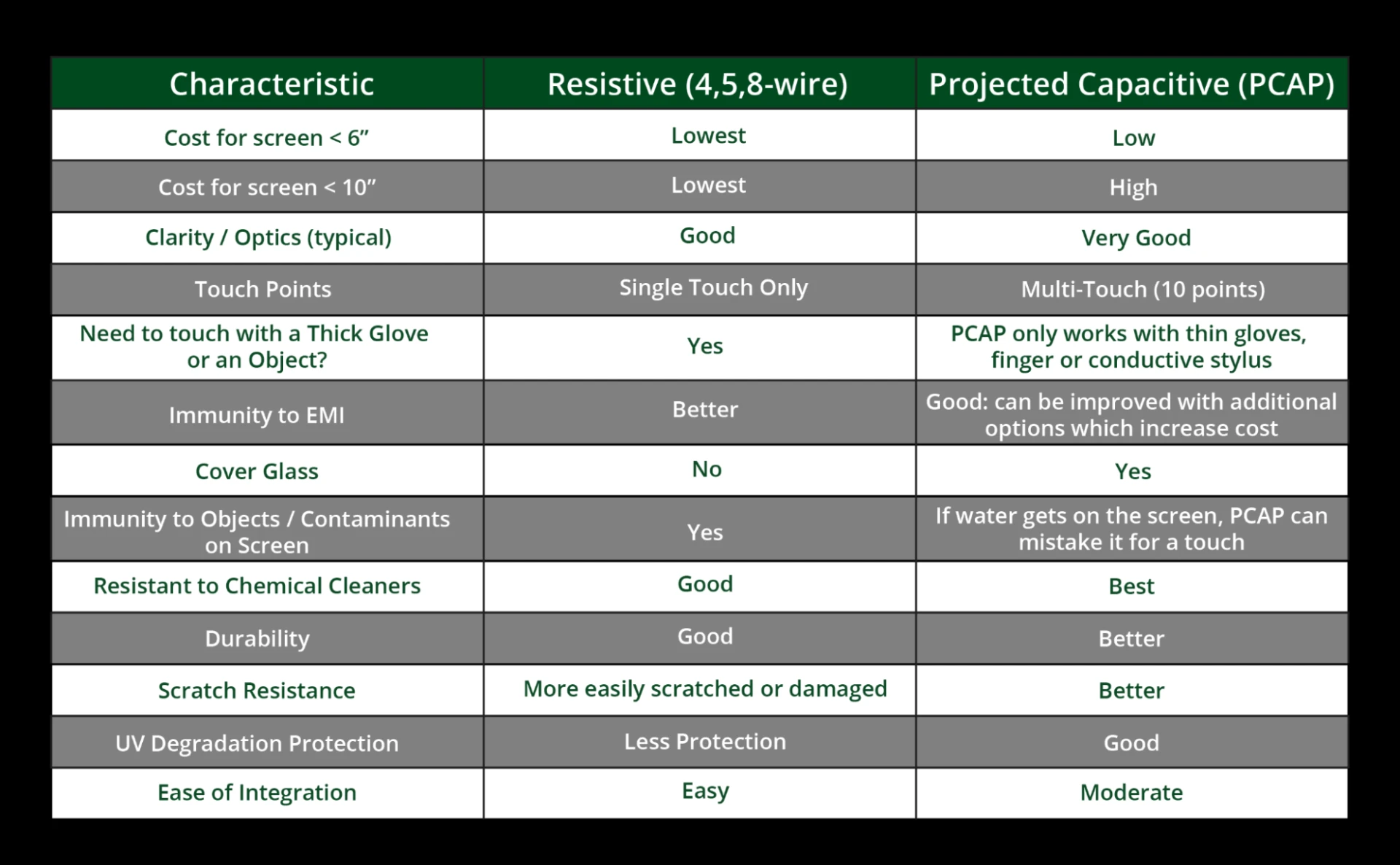
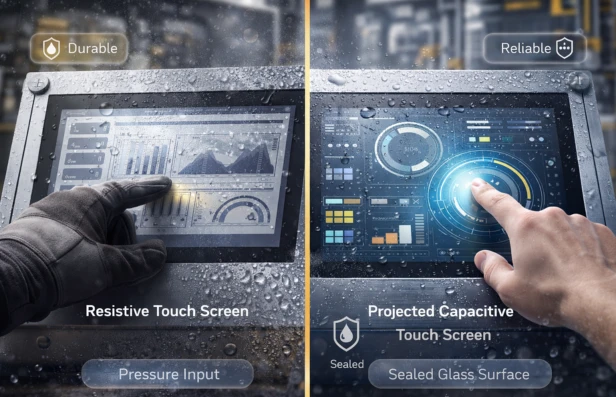
Resistive touch screens are prized for their low production costs, low power consumption, and robust resistance to environmental factors such as dust and water. They can be operated with a bare finger, gloved hand, or stylus, and are well-suited for handwriting recognition applications. However, they do require physical pressure to register input, which means they do not support multi-touch gestures. Additionally, the multiple layers necessary for operation can reduce optical clarity and light transmission, and over time, the constant pressure may lead to wear.
Capacitive Touch Screens
What Is a Capacitive Touch Screen?
Capacitive touch screens offer a more modern approach by detecting touch through the electrical properties of the human body. Instead of requiring pressure, these screens work by sensing changes in an electrostatic field. When a finger or a conductive stylus touches the surface, it alters the capacitance at that point, and the controller interprets this change to determine the touch location.
There are two primary types of capacitive screens. Surface capacitive touch screens use a single conductive layer, where the contact of a finger causes a measurable drop in voltage. More commonly, projected capacitive (PCAP) touch screens utilize two layers of electrodes arranged in a grid. This design not only increases sensitivity and accuracy but also enables multi-touch functionality. PCAP screens are so responsive that they can register touch even when a user wears thin surgical or cotton gloves—a key feature in many modern consumer devices and industrial applications.
Basic Functions and Construction of Capacitive Touch Screens
The basic operation of capacitive touch screens centers on detecting minute changes in capacitance. As a finger approaches the screen, it disturbs the existing electric field, and the system calculates the X and Y coordinates of the touch almost instantaneously. Capacitive screens may use either self-capacitive or mutual-capacitive sensing. In self-capacitive systems, a single electrode detects the increase in capacitance caused by the touch, while mutual-capacitive systems measure the reduction in capacitance between two electrodes that form a capacitor. Although mutual capacitance provides higher accuracy and supports multi-touch, it is also more susceptible to interference from external factors like water or dust.
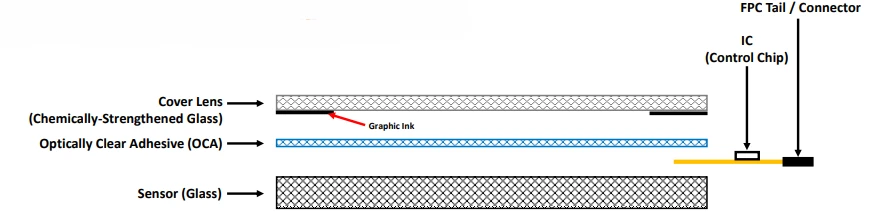
The most common construction for capacitive touch screens is the glass-to-glass method. Here, a chemically strengthened glass cover is bonded to an ITO-coated glass sensor using an optically clear adhesive. This construction provides exceptional clarity and durability and is typically used for larger screens, up to 21 inches. Other methods, such as a film-to-glass plus film construction, offer adjustable thicknesses but tend to be more costly and offer lower transparency.
Advantages and Drawbacks of Capacitive Touch Screens
Capacitive touch screens are renowned for their excellent clarity, high sensitivity, and robust scratch resistance. Their ability to register light touches and support multiple simultaneous inputs makes them ideal for high-performance applications in consumer electronics and commercial settings. However, these benefits come at a higher production cost compared to resistive screens. Additionally, capacitive systems are more prone to interference from electromagnetic sources and generally require a bare finger or a specially designed conductive stylus for optimal operation.
Resistive vs PCAP Comparison Summary
Conclusion
The choice between resistive and capacitive touch screens ultimately comes down to the specific needs of your application. Resistive touch screens offer a cost-effective, durable solution for environments where rugged use and versatility in input methods are critical.
Their simple design makes them well-suited for industrial controls, medical devices, and systems where users may operate the screen with gloves or a stylus. On the other hand, capacitive touch screens deliver superior clarity, responsiveness, and multi-touch functionality, making them the preferred choice for consumer electronics and interactive displays in commercial environments. (See Appendix A for more details).
Beyond the basic technology, both types of touch screens can be enhanced with additional value-add components. Integrating graphic overlays, membrane switches, or various display types (such as LCD or LCD-TFT) can elevate the overall functionality of the device. Moreover, modern touch screens often include dedicated controllers and firmware that allow for fine-tuning of sensitivity and performance, ensuring a seamless user experience.
In summary, understanding the distinct features, construction methods, and performance characteristics of resistive and capacitive touch screens will help you make an informed decision. Whether you value cost efficiency and rugged durability or clarity and advanced multi-touch capabilities, both technologies offer significant benefits that continue to drive innovation in user interface design.
Choosing the right touch screen technology not only enhances product functionality but also supports future upgrades without a complete redesign of the interface. As digital devices evolve, the importance of an intuitive and responsive touch screen will only grow, ensuring that your choice today remains relevant and effective for years to come.























Sign in to leave a comment.