
In today’s digital age, businesses and individuals generate vast amounts of data that need to be stored efficiently. Traditional storage methods, such as external hard drives and cloud subscriptions, may not always offer the ideal combination of security, accessibility, and scalability. This is where Network Attached Storage (NAS) comes into play. But what is NAS, and why is it considered a superior storage solution? This blog explores the advantages of NAS storage solutions, focusing on their centralized, accessible, and secure nature.
What is NAS?
Network Attached Storage (NAS) is a dedicated file storage system connected to a network, allowing multiple users and devices to store and retrieve data from a centralized location. Unlike direct-attached storage (DAS), which is physically connected to a single computer, NAS functions as an independent device with its own operating system, providing seamless data sharing, automated backups, and remote access.
NAS solutions are widely used by businesses, creative professionals, and even home users who require efficient and scalable storage solutions. With NAS, users can enjoy a scale out storage approach, meaning they can expand storage capacity by adding more drives or NAS units without disrupting operations.
Advantages of NAS Storage Solutions
1. Centralized Data Storage
One of the key advantages of NAS is centralized data management. Instead of storing files on multiple devices, NAS consolidates data in one location, making it easier to manage, organize, and access.
- Eliminates the need for external hard drives for each device.
- Reduces redundancy and scattered storage across multiple systems.
- Simplifies file management, ensuring consistency and organization.
2. Enhanced Accessibility & Remote Access
With NAS, users can access their data from anywhere, as long as they are connected to the internet. Unlike traditional storage solutions that require physical access, NAS enables remote work and collaboration.
- Supports multiple users across different locations.
- Allows remote file access through web interfaces and mobile apps.
- Facilitates real-time collaboration among teams.
3. Data Security & Backup Features
Security is a major concern when dealing with critical data. NAS storage solutions offer advanced security measures to protect against data loss, unauthorized access, and cyber threats.
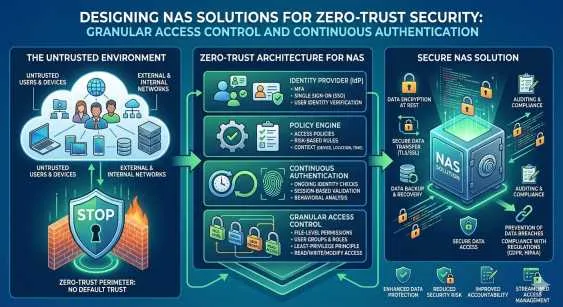
- User Authentication & Permissions: Restrict access based on user roles.
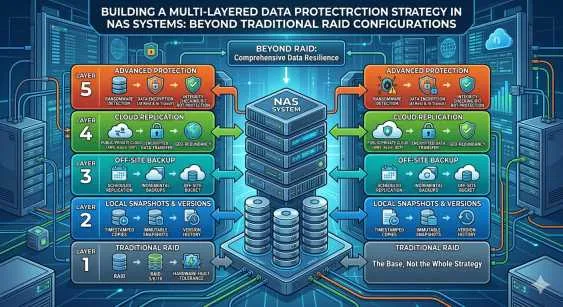
- RAID Configurations: Protect against drive failures by distributing data across multiple disks.
- Automated Backups: Schedule regular backups to prevent data loss.
- Encryption & Firewalls: Secure sensitive data from external threats.
4. Scalability with Scale Out Storage
As businesses grow, their storage needs increase. NAS provides a scale out storage approach, allowing users to expand capacity without system downtime.
- Easily add more storage by installing additional drives.
- Upgrade to higher-capacity drives as needed.
- Connect multiple NAS units for enhanced scalability.
5. Cost-Effectiveness
Compared to cloud subscriptions and enterprise storage solutions, NAS is a cost-effective investment for long-term data storage.
- No recurring cloud storage fees.
- One-time purchase with upgrade options.
- Energy-efficient models available for reduced power consumption.
6. Multi-Device Compatibility
NAS supports a variety of devices, including PCs, Macs, smartphones, and smart TVs. This makes it a versatile storage solution for home and business environments.
- Compatible with Windows, macOS, and Linux.
- Can stream media directly to smart TVs and gaming consoles.
- Supports integration with cloud services like Google Drive and Dropbox.
7. Better Performance & Speed
NAS provides higher data transfer speeds compared to traditional external storage solutions. Many NAS systems come with SSD caching and multi-bay configurations for enhanced performance.
- Faster read/write speeds than traditional hard drives.
- Supports gigabit and 10-gigabit Ethernet connections.
- Optimized for high-demand applications like video editing and virtualization.
Use Cases for NAS Storage Solutions
For Home Users
- Personal Cloud Storage: Store and access files remotely without relying on third-party cloud services.
- Media Server: Stream movies, music, and photos directly to smart TVs and mobile devices.
- Backup Solution: Automate backups for laptops, desktops, and smartphones.
For Small Businesses
- Centralized File Sharing: Enable seamless collaboration between employees.
- Automated Data Backups: Protect business-critical data from loss or corruption.
- Security & Compliance: Meet data protection regulations with encryption and access control.
For Enterprises
- Virtualization Support: Use NAS for virtual machines and enterprise applications.
- Big Data Storage: Handle large-scale data analytics and AI workloads.
- Hybrid Cloud Integration: Sync NAS with cloud services for a hybrid storage approach.
Choosing the Right NAS Storage Solution
When selecting a NAS system, consider the following factors:
- Storage Capacity: Choose the right number of bays (single-bay, dual-bay, or multi-bay) based on your needs.
- Performance Requirements: Look for SSD caching and high-speed Ethernet options if handling large files.
- Security Features: Ensure support for encryption, user authentication, and automated backups.
- Scalability: Opt for a system that allows easy expansion with scale out storage.
Conclusion
NAS storage solutions offer a centralized, accessible, and secure approach to data management, making them an ideal choice for both home and business users. With scale out storage, remote accessibility, and strong security features, NAS ensures that your data remains protected and easily available whenever you need it. Whether you’re a freelancer, a small business, or a large enterprise, investing in a NAS system can streamline your storage needs while saving costs in the long run.
If you’re considering a NAS storage solution, explore different models and choose one that best suits your requirements. With the right NAS, you can enjoy seamless data storage, enhanced security, and hassle-free accessibility—all in one powerful system!
























Sign in to leave a comment.