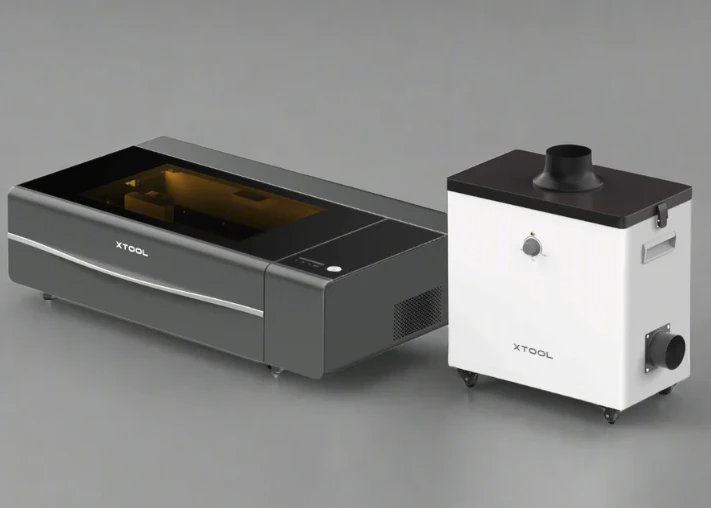

If your school is considering investing in a laser cutter/engraver for its makerspace, design and technology classes, or STEM/STEM-arts programmes, it’s worth understanding what sets the two very similar machines — the xTool P2 and xTool P2S — apart.
With over 20 years in writing about tech and educational equipment, I’ll walk you through the differences, why they matter in a school environment, and help you decide which machine might be the more sensible choice.
A Quick Overview
Both the P2 and P2S are 55 W CO₂ (glass-tube) laser cutters/engravers from xTool. They offer comparable power, cutting capacity, and working area — which means either could serve a school’s design, technology or makerspace needs quite wel.
However, the P2S builds on the P2 by adding a number of refinements — especially in the areas of speed, precision, ventilation and ease of use. The question isn’t just “Can we cut acrylic and wood?” (both can) but rather “Do we want smoother workflow, higher throughput, better alignment, and fewer maintenance headaches?”
Why This Matters in a School Setting
In a school environment, efficiency, safety, ease of use and maintenance are especially important. Teachers may supervise multiple students using the same machine, turnaround time matters (especially in class-period schedules), and maintenance downtime is disruptive. If the machine is to be used by students (junior to senior), features like greater automation, better alignment and more robust ventilation make a real difference.
Also, budget matters.
Schools across the country are already exploring the xTool P2 Australia bundles offered by educational suppliers such as Pakronics, as they come pre-configured for classroom safety and teacher training support.
If one machine accomplishes “enough” for the curriculum, the extra cost of an upgrade might not be justified. But if your school is aiming for more advanced projects, higher throughput or shared use across classes, then the upgraded model may pay off.
Key Differences
Here are the most meaningful areas where the P2S differs from the P2 — and what those differences really mean for classroom use:
1. Acceleration and Workflow Speed
While both machines offer a maximum engraving speed of up to ~600 mm/s, the P2S boasts double the X-axis acceleration (6,400 mm/s² versus around 3,200 mm/s² on the P2)
What this means: For complex jobs or detailed raster engraving (think lots of student prototypes, many cuts, many engravings), the P2S reaches top speed faster — so jobs finish sooner, ideal if you have tight time slots or many students queued.
2. Air Assist & Ventilation / Smoke Management
The P2S upgrades the air-assist pressure (200 kPa) versus 150 kPa on the P2, and its exhaust fan system is significantly improved (dual fans, easier cleaning, magnetic filters) in the P2S.
What this means for schools: Laser cutting and engraving generate fumes, smoke and particulate residue. Better ventilation means cleaner work, safer environment, fewer char marks on cuts, and less frequent maintenance or downtime — a major plus when used by multiple students.
3. Camera & Alignment / Curved-Surface Capability
The P2S includes an AI-enhanced dual-camera system, improved autofocus, and support for curved-surface engraving (objects not flat) — features the P2 lacks (or has in more basic form).
Why this matters in school: If students will be engraving on irregular surfaces (e.g., cylinders, tumblers, 3D forms) or if alignment and precision are critical (for product design, prototyping or competition work), the P2S reduces waste and set-up time. For simple flat engagements only, it may be less essential.
4. Maintenance & Usability Features
The P2S introduces magnetic access panels, much easier fan removal / cleaning, quick-release components, and extra accessory ports for future expansion (rotary attachments, feeders) — enhancements over the P2.
A machine that is easier to maintain means less specialist intervention, less downtime, and greater likelihood students will stay focused on design rather than machine troubleshooting.
5. Budget & Value Trade-off
Because of the additional features, the P2S carries a higher price tag (typically). For many school contexts, the standard P2 may provide “good enough” capability with strong value. Reviews note that for occasional or lighter use, the P2 is still very capable.
In practice: If your curriculum focuses on flat-material prototypes (wood, acrylic) and you expect moderate usage (one class a day), the P2 may suffice. If you expect heavy throughput (many students, many jobs per day), or you foresee more advanced work (curved surfaces, irregular materials), the investment in the P2S may pay off.
Practical Decision Factors for a School
Here are some decision-guiding questions (with educational context) to help determine which machine is right for your environment:
How many students/projects will use the machine daily?
If you expect high volume (multiple groups per day), then faster throughput and easier maintenance of the P2S may reduce bottlenecks.
What materials and geometry will students work with?
If mostly flat sheets (plywood, MDF, acrylic), the P2 will do well. If many curved or irregular items (cups, curved surfaces, non‐standard shapes), the P2S’s curved-surface support is advantageous.
What is the budget?
Schools always balance budget. If funds are limited, getting the P2 might allow allocation of remaining funds to materials, training, safety equipment, or software rather than premium machine features.
Who will maintain the machine?
If school staff handle it, ease of maintenance is a bonus (points to P2S). If it’s outsourced or seldom used, simpler machine (P2) may suffice.
Future-proofing and expansion?
If you envision scaling up, adding rotary attachments, feeder systems, higher precision jobs, the extra accessory ports and future-readiness of the P2S make sense.
Recommendation Summary
For most school makerspaces, the xTool P2 presents a very good value: it’s capable, robust and will cover most curriculum needs nicely. If your budget is limited, it’s a solid choice.
However, if your school is operating a dedicated design/technology lab, servicing many students, or supporting advanced prototyping (curved surfaces, many jobs, high throughput), then the xTool P2S is a worthwhile upgrade: faster, cleaner, more precise, and easier to maintain — all attributes that reduce friction in educational use.
Final Thoughts
In my experience, the choice between a base model and an enhanced model in a school setting often comes down to “how many interruptions can we tolerate, how many students will queue, and how much throughput do we expect?” With the xTool P2 vs P2S, the hardware difference is clear: same baseline capability, but the P2S makes the experience smoother, faster and more robust for high-use environments.
If I were advising a school starting out, I’d ask:
- If your class uses the laser one or two sessions a week with simple jobs, the standard P2 will do very well.
- If your school’s makerspace runs dozens of student jobs a week, supports student-led fabrication, or aims to support external services (school club, community access), go with the P2S ― the extra investment buys you smoother daily operations.
Either way, alongside whichever machine you pick, invest in training, safety (extraction, ventilation, personal protective equipment), material budgeting, and maintenance routines — those matter just as much as choosing the “right model”.



























Sign in to leave a comment.