
Migrating from Mac Outlook (OLM) to Windows Outlook (PST) can be a real challenge—especially if you're trying to do it manually. Whether you're a tech-savvy user or a corporate IT admin, choosing the right migration method is crucial to ensure no data loss, minimal downtime, and complete integrity of your mailbox.
Are you planning to switch from Mac Outlook to Windows Outlook? If so, you’re likely dealing with OLM files—Mac’s proprietary Outlook format—which aren’t natively compatible with Windows Outlook that uses PST files. This is where the ATS OLM to PST Converter comes in as a fast, reliable, and user-friendly solution.
In this blog, we’ll compare manual OLM to PST conversion methods with the ATS OLM to PST Converter, helping you decide which approach is best for your needs
Manual OLM to PST Conversion – The Traditional Approach.
Manual methods involve a multi-step process that typically includes:
- Creating an IMAP-enabled email account (like Gmail)
- Syncing Mac Outlook data to the IMAP account
- Re-configuring the same IMAP account in Windows Outlook
- Copying data from IMAP folders to PST in Outlook
Limitations of the Manual Method:
- Time-consuming & complex: Multiple steps increase chances of error.
- Requires technical knowledge: Not beginner-friendly.
- Partial data migration: Often fails to migrate calendars, contacts, and metadata.
- No support for batch export: One mailbox at a time.
- Risk of data loss or corruption during sync.
Notes: While manual migration is free, it’s not reliable for large-scale or professional use
ATS OLM to PST Converter – The Professional Solution
The ATS OLM to PST Converter is a purpose-built tool that allows users to directly convert Mac Outlook OLM files to PST and other formats like MBOX, EML, MSG, and HTML. It simplifies the entire migration process and ensures that all data—including emails, attachments, contacts, calendars, and folders—are migrated without a single byte of loss.
Key Features of ATS OLM to PST Converter:
- Batch conversion of multiple OLM files at once
- Preserves folder hierarchy, attachments & formatting
- Preview OLM file contents before saving
- Direct export to Office 365 & Live Exchange
- Supports all Outlook versions (2000 to 2021)
- Compatible with Windows 11, 10, 8.1, 7 (32 & 64-bit)
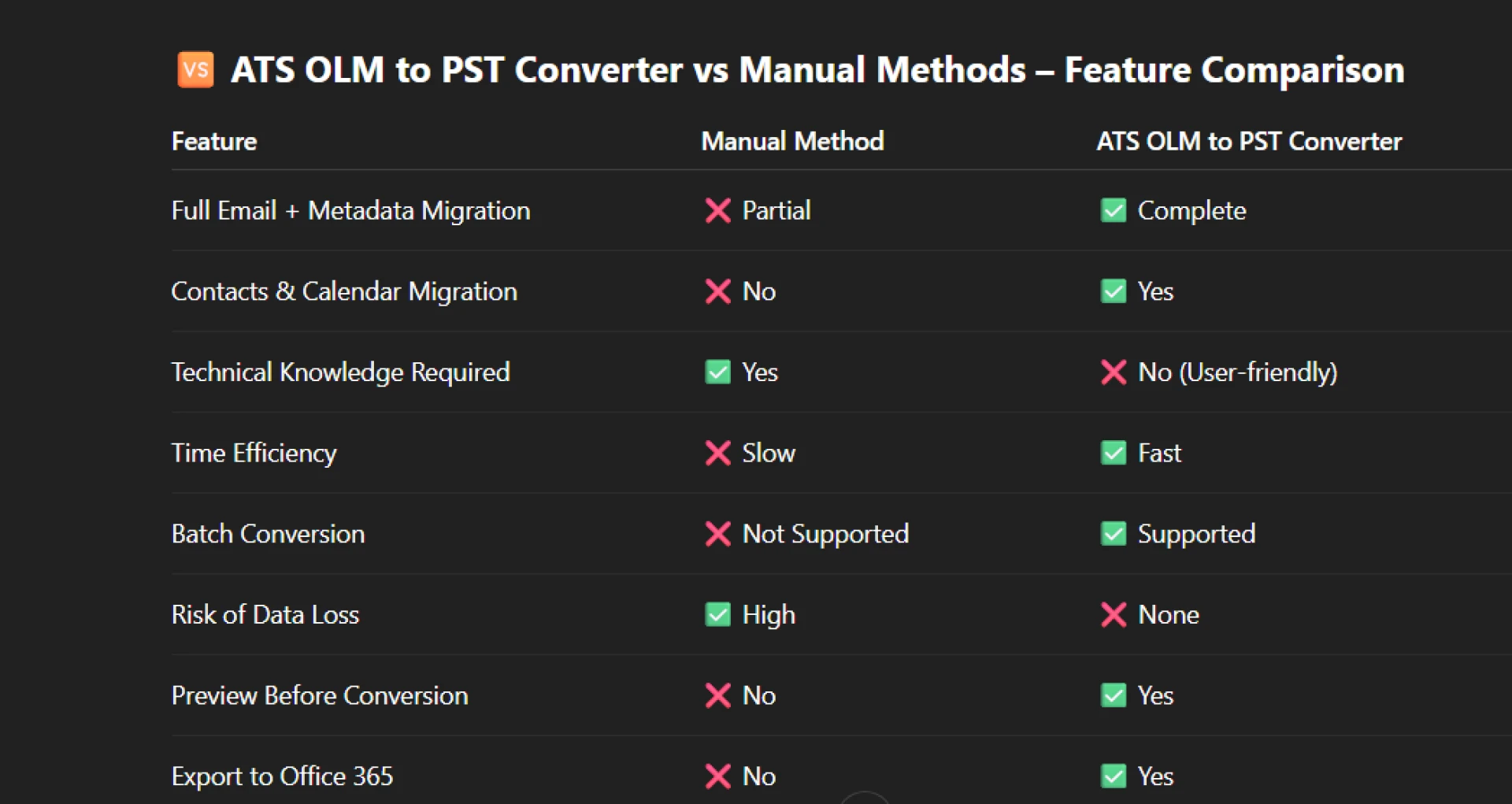
Conclusion: Which Should You Choose?
If you're an individual with minimal data and technical experience, the manual method may seem like a free option—but it's risky, limited, and not suitable for complete migration.
On the other hand, the ATS OLM to PST Converter offers a safe, simple, and professional-grade solution for anyone serious about preserving their data and time. It ensures accuracy, speed, and full data integrity—all with minimal effort.

























Sign in to leave a comment.