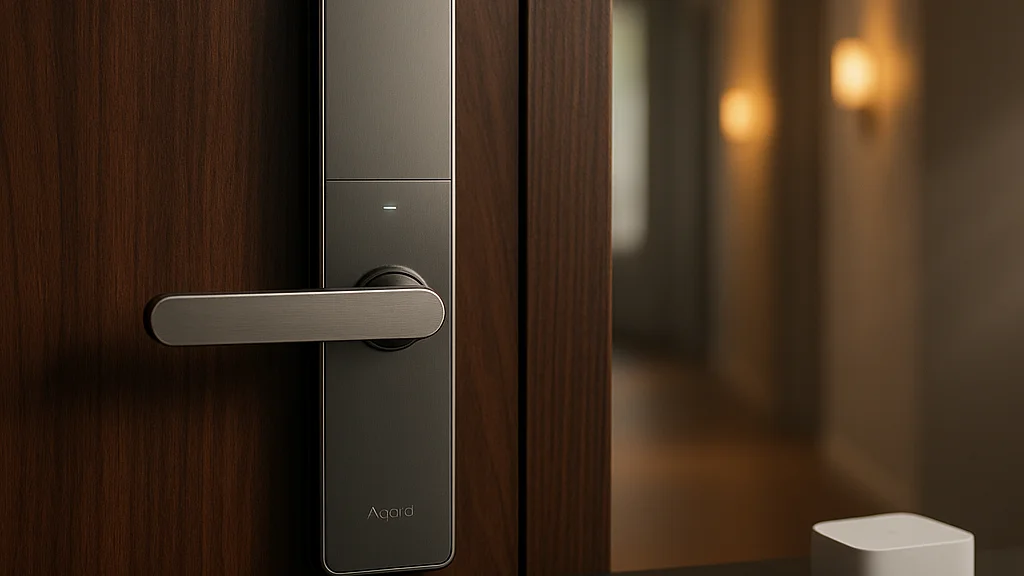

What if the most productive upgrade in your home office is not a monitor, a chair, or a keyboard, but your front door? Sounds dramatic! But for remote workers, freelancers, founders, and anyone who treats home like mission control, the friction around entering, securing, and managing that space is not trivial. It is time, interruption, and mental load. Aqara’s Smart Lock U400 lands right in that gap with a pitch that feels pulled from the future: hands-free unlocking powered by ultra wideband, plus deep Apple Home integration and broad smart-home compatibility. That is why this device has become such a loud topic across CES coverage, Apple circles, and smart-home forums.
The U400 first drew broad attention when Aqara unveiled it at CES 2026. Coverage from MacRumors highlighted the lock’s HomeKit support and UWB-based hands-free entry, while 9to5Mac’s review pushed the conversation further by framing it as one of the most futuristic HomeKit locks to reach consumers. That matters because smart locks have been around for years, yet many still feel clunky in daily life: too many taps, too many app prompts, too much “smart” setup for too little payoff.
For remote work and productivity, the U400 deserves a closer look for one simple reason: it promises to remove a tiny but constant source of drag. If your day includes school runs, coffee pickups, dog walks, package arrivals, client visits, cleaners, or coworking-from-home chaos, a lock that can recognize your approach and open without a fumbling ritual changes the rhythm of the day. Aqara is not just selling convenience here. It is selling flow! And flow is currency when your office is also your kitchen, your hallway, and your front step.
If you want a broader baseline before this deep dive, WriteUpCafe has already tracked the product in this U400 review overview and this follow-up analysis. What follows is the sharper, bigger picture: what the U400 is, how the hands-free tech works, where it shines, where it may frustrate, and why it matters much more for remote workers than the average gadget launch.
Why a smart lock belongs in a productivity conversation
Most people file smart locks under home tech, not work tech. I get it. A lock is a lock, right? Not quite. Remote work has collapsed the old boundary between “home infrastructure” and “work infrastructure.” Your door now mediates a surprising amount of professional life. It decides whether a courier can drop off a laptop replacement securely. It shapes whether a client, contractor, or teammate can enter a shared workspace. It affects whether you lose focus hunting for keys while carrying groceries and a backpack after a long day of hybrid commuting. Tiny frictions stack up, and stacked friction is the enemy of deep work.
The U400 enters a market where the core problem is no longer simple remote unlocking. Plenty of locks can do that. The real challenge is low-friction authentication. Keypads help. Fingerprint readers help. Phone-based geofencing helps sometimes, then fails at exactly the wrong moment. Aqara’s bet is that ultra wideband, or UWB, can do better by measuring precise spatial awareness rather than just guessing proximity through Bluetooth. According to MacRumors’ CES report, the U400 is designed to work with Apple Home and hands-free UWB entry, positioning it directly against the biggest pain point in smart locks: the awkward pause at the door.
For remote professionals, that pause is more than a nuisance. It often happens when your hands are full of work gear or when you are rushing between calls. Think of the common scenarios:
- You return from a lunch meeting carrying a laptop, coffee, and notes.
- A family member needs temporary entry while you are on a video call.
- A cleaner or dog walker needs access at a precise time.
- You want an audit trail of who entered and when.
- You need your home office to lock automatically after a hectic morning exit.
That is where the U400 starts to look less like a gadget flex and more like workflow infrastructure. It can reduce interruptions before they become context switching. It can cut out repetitive micro-decisions. It can also improve the psychological boundary around your workspace: secure when you need it, invisible when you do not. And yes, that is a very remote-work problem in 2026, when home security, package management, and flexible schedules are all tangled together.
The smartest home device is often the one you stop noticing. If a lock works at walking speed, it protects attention as much as property.
That is the key standard to judge the U400 by. Not whether it looks futuristic on your phone screen, but whether it disappears into your day.
What the Aqara U400 actually offers
Strip away the hype and the U400’s feature set is straightforward, though ambitious. Aqara built this lock around several access methods rather than forcing users into one ecosystem habit. Reports from MacRumors, MSN, and 9to5Mac point to the standout feature being hands-free unlocking via UWB, especially for Apple users. UWB is the same class of technology used in location-aware device interactions, and its appeal is precision. Instead of merely detecting that your phone is “somewhere nearby,” it can help determine whether you are approaching the door in a way that should trigger entry.
That distinction matters. Traditional Bluetooth-based smart entry can be messy. You walk past the door and it wakes up. You stand outside and it hesitates. You come home with a phone in your pocket and still end up opening an app like it is 2019. Aqara’s U400 aims to solve that with a more seamless approach. According to MSN’s coverage, the product’s central promise is exactly that: a lock that can unlock as you arrive without the usual dance.
Beyond that headline, the U400 appears to support the practical layers buyers expect from a premium smart lock:
- Apple Home compatibility, including Home Key support in Apple Wallet as reported by 9to5Mac and MacRumors
- Hands-free entry using UWB for compatible Apple devices
- Alternative unlocking methods for households that do not want to rely on one phone workflow
- Smart-home automation potential through Aqara’s broader ecosystem
- Remote management and access control features depending on setup
PC Magazine’s product coverage also places the U400 in the premium category, which is important context. This is not a bargain-bin retrofit for people who only want keypad access. It is a higher-concept device aimed at users who care about ecosystem fit, automation, and a polished arrival experience. Geeky Gadgets went even harder on the UWB angle, arguing in its analysis that the technology makes the U400 a lock to beat because it addresses the biggest usability gap in the category.
The practical takeaway is simple: the U400 is not trying to win on sheer novelty. It is trying to become the first lock that feels natural enough to replace old habits without creating new annoyances. That is a much tougher challenge than adding one more unlock option.
Convenience only counts when it is reliable. A smart lock that saves 10 seconds on a good day but wastes 2 minutes on a bad one is not smarter. It is just louder.
Hands-free unlocking: the real test is trust, not tech specs
This is where the review conversation gets serious. UWB sounds cool. It also sounds like the kind of feature people post on TikTok for a week and then quietly disable if it misfires. So the right question is not “Does hands-free unlocking exist?” It clearly does. The right question is whether it is trustworthy enough to become your default behavior.
According to 9to5Mac’s April 2026 review, the U400’s biggest strength is that it brings a more futuristic Apple Home lock experience into the mainstream. That review framed the lock as a meaningful step forward for users already invested in Apple’s ecosystem. The implication is huge: if the lock works best when paired with Apple devices and Home infrastructure, then the U400 is strongest not as a universal lock for everyone, but as a premium tool for a certain kind of user. Namely, people who already live inside iPhone, Apple Watch, and Home automations.
For remote workers, that ecosystem dependence is both a benefit and a caution. The benefit is obvious. Apple-heavy households often want fewer apps, fewer onboarding headaches, and tighter automation. The caution is that “hands-free” is never purely hardware. It depends on device compatibility, software updates, radio behavior, background permissions, and how your home layout affects approach detection. A narrow hallway, metal door, recessed entry, or dense apartment corridor can all influence real-world performance, even when a feature looks flawless in a launch demo.
Here is the productivity lens I would use when evaluating the U400:
- Consistency: Does it unlock correctly when you approach with your usual bag, coat, and phone placement?
- Speed: Is it faster than pulling out a key or tapping a keypad?
- Fallbacks: If UWB fails, can you enter immediately with another method?
- Household fit: Can different users, including less tech-comfortable family members, use it without drama?
- Security confidence: Do you trust its automation enough to stop double-checking the door?
If the answer is yes across those five points, the U400 becomes more than convenient. It becomes invisible. That is the dream. And invisibility is underrated in smart-home design! The best productivity tool is often the one that reduces rituals rather than adding them.
There is also a subtle advantage for people who work from home full time: arrival transitions. Behavioral research around work routines has long shown that transitions matter for focus. A smooth re-entry into the house after errands or school drop-off can reduce the stop-start energy that kills momentum. That may sound small, but ask anyone who has lost a train of thought while juggling keys, parcels, and Slack notifications. The front door is part of the workday now.
How the U400 compares with older smart-lock habits
Smart locks have moved through clear phases. First came keypad convenience. Then app control. Then fingerprint unlocking gained traction because it felt immediate and local. After that, geofencing and voice-assistant automations tried to make entry feel more passive, but those systems often stumbled on accuracy. The U400 represents the next phase: spatially aware entry. That sounds technical, yet the user-facing idea is dead simple. The lock should know you are at the door, not merely near the house.
Why does that matter? Because older methods each carry a tax. Keypads require memorization and can create shoulder-surfing concerns. Fingerprint readers are fast, but not every household member likes using them, and environmental conditions can affect sensors. App unlocking is flexible but slow. Bluetooth auto-unlock can be inconsistent. Geofencing can trigger too early or not at all. Physical keys remain reliable, but they are the opposite of seamless when your hands are full or your routine is chaotic.
Against that backdrop, the U400’s value proposition becomes easier to understand. It is not merely that it adds another way in. It tries to eliminate the moment of choice altogether. No key, no code, no tap, no pause. For remote workers, that can be surprisingly meaningful because home entry is often entangled with productivity systems. Consider what older lock habits force you to manage:
- Where your keys are when you switch bags
- Whether a contractor remembered the door code
- Whether a family member locked up after leaving
- Whether you can verify an arrival while on a call
- Whether automations triggered correctly after you left home
This is also why the U400 sits comfortably beside other productivity-minded home upgrades. If you have optimized your desk but ignored access control, you are optimizing the middle of your day while leaving the edges messy. WriteUpCafe’s main U400 review makes a similar point in broader smart-home terms: convenience compounds when the device fits your routine instead of asking for a new one.
That said, older habits do still have one advantage: they are familiar. A key rarely needs a firmware update. So the U400 has to earn trust through repetition. If it does, it can replace several old rituals at once. If it does not, users will fall back to the method they know. That is the razor’s edge for every smart lock, and the U400 is no exception.
What changed recently and why the 2026 context matters
The U400 is arriving at a moment when smart-home expectations are shifting fast. CES 2026 did not just produce another wave of connected gadgets; it reinforced a broader market trend toward devices that are more interoperable, more ambient, and less dependent on constant manual app use. Aqara’s announcement landed in that exact conversation. MacRumors’ January coverage placed the U400 among the more notable Apple-home launches of the show, and that timing matters because Apple users have been waiting for locks that feel native rather than compromised.
By spring 2026, the conversation had matured from announcement buzz to hands-on evaluation. 9to5Mac’s review in April added practical credibility by focusing on lived experience rather than CES-stage claims. That shift is crucial. Launches are about possibility. Reviews are about friction. When reviewers keep emphasizing the U400’s futuristic feel, they are really saying Aqara may have narrowed the gap between promise and habit.
There is also a market-level reason the U400 feels timely. Remote and hybrid work patterns have stabilized rather than vanished. Employers may have pushed for more office time in some sectors, but millions of people still spend significant work hours at home. That means household access control remains a live issue, not a pandemic relic. Package theft concerns, flexible caregiving schedules, and service-provider access are all still part of ordinary professional life. A smarter lock is not an indulgence when your home handles deliveries, equipment, and work documents.
Three 2026 developments make the U400 more relevant than a similar product would have been a few years ago:
- Apple ecosystem maturity: Home Key and deeper Home integration now matter more because users expect wallet-based access to work reliably across devices.
- Higher consumer tolerance for automation: People are more comfortable with routines, scenes, and presence-based actions than they were in the early smart-home era.
- Stronger demand for low-friction security: Households want security that does not create extra steps, especially in mixed work-home environments.
That combination gives Aqara a serious opening. The company is not trying to convince consumers that smart locks exist. It is trying to convince them that smart locks can finally feel effortless. Big difference! And in 2026, that is the only pitch that really cuts through.
Who should buy it, who should wait, and what to check before installing
Here is the blunt answer: the Aqara U400 looks most compelling for Apple-centric households that care deeply about convenience, automation, and polished daily use. If you are an iPhone user, already use Apple Home, and want your front door to behave more like Face ID than like a keypad from 2017, the U400 is easy to understand. If your household is mixed-platform, less automation-heavy, or skeptical of invisible systems, you should slow down and evaluate fit carefully.
The first thing to check is hardware compatibility with your existing door and lock setup. Smart locks can look universal in product shots and turn into a two-hour install headache in real life. The second is ecosystem alignment. The U400’s headline feature is tied closely to Apple-oriented experiences, so Android-first households may not get the same wow factor. The third is fallback comfort. Every smart lock should have a backup route you trust instantly. If you are the sort of person who gets stressed by any uncertainty at the door, that matters more than the spec sheet.
For remote workers specifically, the strongest use cases are easy to spot:
- Home offices that receive frequent deliveries or service visits
- Busy households where entry and exit happen in overlapping waves
- Users who carry gear and want true hands-free arrival
- People who already build routines around Apple Home automations
- Professionals who value access logs and remote control options
You may want to wait if your priorities are different. If price sensitivity is high, a keypad or fingerprint lock may offer enough value for less money. If your household includes users who strongly prefer physical keys, the U400’s premium features may go underused. And if you rent, installation permissions and door hardware constraints can be the deciding factor before any feature discussion even begins.
My strongest advice is to test the lock as a system, not a gadget. Run arrival tests. Try it with different users. Simulate a dead-phone scenario. Check whether automations help or annoy. If it survives a week of real life without making you think about it, that is the best possible review. If you keep noticing it, something is off.
The bottom line for remote work and home productivity
So, what do you really need to know about the Aqara Smart Lock U400? Here it is! This lock matters because it attacks one of the last stubbornly awkward moments in the smart home: the act of walking up to your own door and expecting it to understand that you are there. Aqara’s use of UWB, combined with Apple Home positioning and premium smart-lock ambitions, makes the U400 one of the more interesting access devices to watch in 2026. According to MacRumors, MSN, 9to5Mac, PC Magazine, and Geeky Gadgets, the product’s identity is consistent across coverage: seamless entry is the point, not a side feature.
For remote workers, that is not trivial. The home office is not just a room anymore. It is a network of transitions, permissions, deliveries, interruptions, and routines. A front door that reduces friction can protect focus, improve household coordination, and make automations feel useful instead of performative. That is why a smart lock belongs in the productivity category. It shapes how work begins, pauses, and resumes.
The caveat is equally clear. The U400 is not magic. It will be best for users whose devices, habits, and expectations match its design philosophy. If you want a universal, cheap, dead-simple lock for every possible household, this may not be your lane. If you want a high-end lock that turns arrival into a near-invisible experience, the U400 looks like one of the strongest entries in that conversation.
My final read is confident but measured: the Aqara U400 is exciting because it makes smart-home ambition feel practical. Not flashy for the sake of flashy. Practical! If Aqara has nailed reliability in everyday use, this is the kind of product that people stop calling a gadget and start calling normal. And honestly, that is when tech wins.
For readers comparing perspectives, it is worth revisiting WriteUpCafe’s earlier takes, including this review breakdown and this rethink of the U400 experience. The broad conclusion holds: if your work life runs through your home, your lock is no longer background hardware. It is part of your operating system.






















Sign in to leave a comment.