


For years, the gold standard for connecting a laptop to a TV or a Blu-ray player to a projector was a thick, reliable HDMI cable. But as we move further into 2026, the 15-meter distance limit and rigid hardware of “the wire” can’t keep up with modern multi-screen environments. HDMI over IP (part of AV over IP) solves this by leveraging your existing network to send high-definition video across buildings without signal loss.
What is HDMI over IP?
At its core, HDMI over IP is a transmission technology that processes a compressed or uncompressed signal and transfers it over a standard computer network.
Unlike a traditional setup where a physical switcher sits in a rack with dozens of cables plugged into it, an HDMI over IP system uses your local area network (LAN). It converts the HDMI signal into data packets (standard Ethernet traffic), allowing you to integrate and manage multiple network devices without the distance limits of old-school hardware.
How Does HDMI over IP Work for Your Home or Office?
To understand how this works, think of it as a digital translation service:
- The Encoder (Transmitter): Devices like the AV over IP Encoder connect to your source (PC, Media Player). It “encodes” the video into digital data packets.
- The Network Switch: This acts as the “traffic controller,” sending those data packets to the right destination via Ethernet cables.
- The Decoder (Receiver): This device sits behind your display, “decodes” the packets back into an HDMI signal, and plugs into your TV or monitor.
Challenges to Solve Before Your HDMI over IP Deployment
Before you swap out your cables, there are 8 critical facts you need to understand to ensure a “plug-and-play” experience.
1. Network Traffic: Why you need a “Managed Switch”
Because video data is “heavy,” it can overwhelm a basic home router. To manage an HDMI over IP system effectively, you generally need a Managed Ethernet Switch. This allows you to set up VLANs (Virtual Local Area Networks) and IGMP Snooping so your office emails don’t compete with your 4K video distribution.
2. Picture Quality: Balancing 4K resolution with your speed
High resolution usually requires massive bandwidth. However, the NetworkHD 100 Series is a favorite because it uses low-bandwidth, scalable compression. The WyreStorm NHD-120-TX excels here, delivering 4K visuals over standard 1GbE networks. By utilizing bandwidth-efficient H.264/265 compression, it eliminates the need for costly 10GbE fiber infrastructure.
This high-performance balance was proven several months ago when Hollywood Bowl Reading transformed its guest experience using the WyreStorm NetworkHD 120 AV over IP solution. They maintained crystal-clear quality across dozens of screens while keeping network loads perfectly manageable.
Also Read: Hollywood Bowl Reading Transforms with WyreStorm NetworkHD 120 AV over IP Solution
3. Video Lag: How to ensure “Real-Time” performance
Latency is the enemy of live presentations or sports. When selecting your hardware, look for “low latency” specs. Choosing high-efficiency codecs like JPEG 2000 (NetworkHD 500 Series) ensures the “Real-Time” performance required for command centers or interactive displays.
4. Power Cables: Using PoE to keep your setup clean
Nobody wants a messy wall behind a premium display. Most professional HDMI over IP units support PoE (Power over Ethernet). This allows the Encoder and Decoder to draw power directly from the Ethernet cable, eliminating bulky power bricks at every screen.
5. Future Growth: Adding more screens without new wires
Scalability is the biggest “win.” In a traditional system, adding a 5th TV often means replacing an entire 4x4 matrix. With an IP-based system, you simply buy one more decoder, plug it into your network switch, and you’re done.
6. Video Walls: Powerful support for commercial installs
Modern IP solutions eliminate the need for costly external video wall processors. The NHD-120-TX supports powerful video wall configurations up to 16×16, making it the best all-round solution for commercial AV installs where a massive digital canvas is required.
7. Greater Distance: Breaking the 100-meter barrier
Standard Ethernet allows for 100 meters (328 feet) between endpoints. However, because you can use a daisy-chain topology with multiple network switches or utilize fiber optic cables, your transmission distance is effectively infinite.
8. Flexible Control: Management via Software and Apps
Since the system is on the network, you aren’t limited to a physical remote. You can use a keyboard, PC software, or mobile apps to route any source to any screen with a simple drag-and-drop interface, making large-scale management effortless.
As a pioneer in the AV over IP field, WyreStorm has already launched the Companion Control App, a supplemental smart application for the NetworkHD Touch system, which offers direct source control in any environment.
Practical Set-Up Tips for a Successful HDMI over IP Install
When setting up a high-performance unit like the NHD-120-TX/RX, the physical connection is straightforward. Below is a conceptual diagram of how a NetworkHD 100 Series system integrates into a commercial environment:
Press enter or click to view image in full size
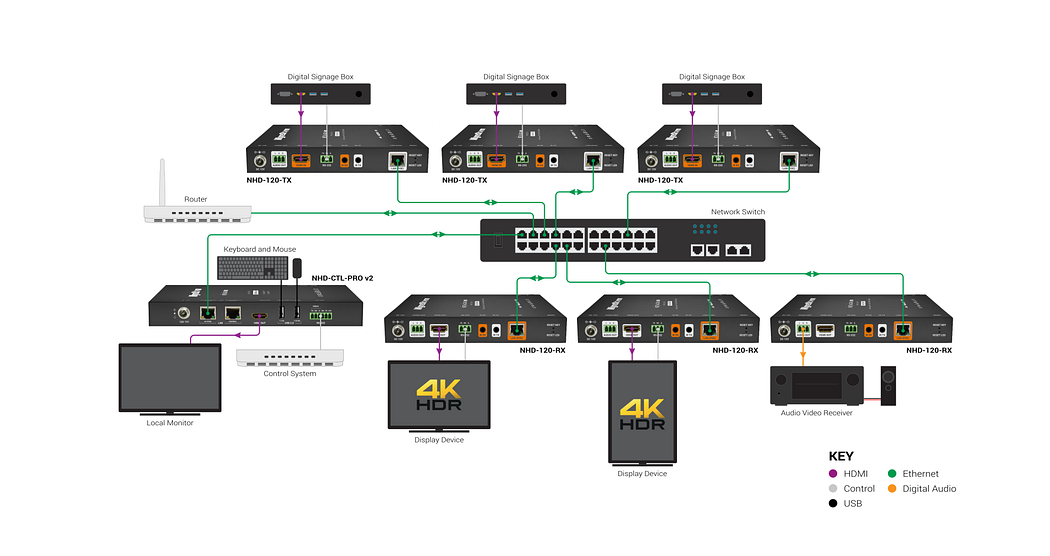
[Source (PC/NVR)] → HDMI Cable → NHD-120-TX (Encoder) → Cat6 Cable → Managed 1GbE Switch → Cat6 Cable → NHD-120-RX (Decoder) → HDMI Cable → Display/Video Wall
The NHD-120-TX is particularly powerful for commercial installs because it supports video walls up to 16x16, allowing you to turn a group of standard TVs into one massive, coordinated display.
Quick Hardware Checklist: What Do You Actually Need
- Sources: Your PCs, media players, or cameras.
- Encoders: Such as the WyreStorm NHD-120-TX.
- Decoders: One for every display in your setup.
- Network Switch: A Layer 2 or Layer 3 managed switch (1GbE is standard for H.264/5).
- Cabling: Cat5e/6 or higher.
Watch the NHD 100 Series Overview from WyreStorm Academy (HDMI over IP)
Conclusion: Is HDMI over IP the Right Choice for You?
If you are managing a single TV in a small room, a standard HDMI cable is fine. But if you need to send signals over 30 feet, manage multiple screens, or build a scalable video wall, HDMI over IP is the definitive path forward. It offers better distance, easier control via mobile apps or PCs, and a significantly lower cost-per-endpoint as your system grows.
Frequently Asked Questions (FAQ)
Q: Can I run HDMI over IP on my existing Wi-Fi?
A: While possible in some niche DIY setups, it is highly discouraged for professional use. High-definition video requires the stability and “dedicated lanes” of a wired Ethernet connection to prevent flickering or lag.
Q: Does HDMI over IP support 4K?
A: Yes. Many modern encoders, including those in the NetworkHD line (WyreStorm NHD series), support 4K resolution while keeping bandwidth low enough to run on standard 1GbE networks.
Q: What is the maximum distance?
A: A single “run” from a switch to a device can be 100 meters (328 feet). However, since you can link switches together or use fiber optics, the distance is effectively infinite.
About WyreStorm
WyreStorm delivers professional-grade AV over IP solutions, HDMI matrix systems, and advanced wireless presentation and conferencing systems for seamless collaboration.
Its portfolio also includes highperformance HDMI Extender and KVM Extender products designed for reliable, scalable signal distribution.
Explore more innovative solutions at WyreStorm.com and elevate your next project today.





























Sign in to leave a comment.