

In today's digital landscape, effective data storage is not just an option; it’s a necessity that shapes the operations of individuals and businesses. With more data than ever being generated—over 2.5 quintillion bytes daily—it becomes crucial to have precise systems in place to manage this information. Understanding how to set up network storage solutions effectively can streamline your operations, enhance productivity, and secure your vital data.
Network-attached storage (NAS) allows users to access large amounts of data from different devices while maintaining security and efficiency. This post will guide you through the process of setting up network storage solutions, making what may seem like a daunting task feel achievable and straightforward.
Understanding Network Storage Solutions
Network storage solutions encompass various technologies enabling users to store and access data over a network. This fundamental capability allows individuals and organizations to share files securely among multiple users and devices, avoiding the limitations of physical hardware.
NAS plays a central role in network storage solutions. It is a dedicated file storage device that allows users to retrieve data from a centralized disk system. For example, with NAS, a small business can store employee documents, design files, and client contracts in a single repository, accessible by all authorized team members. This setup can enhance collaboration, making it easier to work together on projects no matter where the team members are located.
Benefits of Network Storage Solutions
Implementing network storage solutions like NAS brings several advantages beyond just storage. Here are some key benefits:
1. Centralized Data Management
Centralized data management stands out as a primary advantage of NAS. By storing all data in one location, it becomes easier to manage access and maintain file integrity. For instance, a report from a leading IT research firm found that businesses using centralized storage saw a 30% reduction in file version conflicts, ultimately saving both time and storage space.
2. Scalability
Scalability is another attractive feature of network storage. As organization needs grow, expanding storage capacity can be accomplished without substantial hardware modifications. For example, a company can start with a 4TB NAS and scale up to 24TB or more simply by adding additional drives. This flexibility is vital for businesses that anticipate rapid growth.
3. Cost-Effectiveness
Using NAS often proves more economical than traditional storage methods. By making use of existing network infrastructure, organizations can minimize costs associated with physical storage solutions. A study indicated that businesses that transitioned to NAS saved nearly 40% on data storage expenses while improving their access speeds by up to 70%.
Key Considerations for Setting Up NAS
Before setting up your network storage solutions, consider several factors that can impact your setup's effectiveness.
1. Choosing the Right Hardware
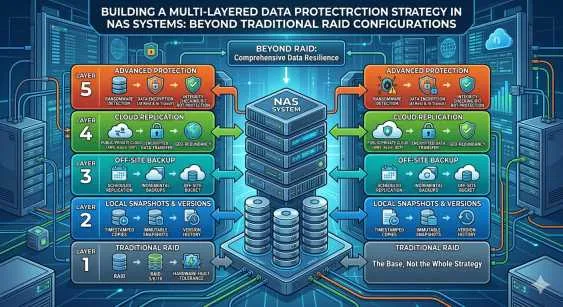
Selecting the right hardware is critical for a successful NAS setup. Key factors include storage capacity, processing power, and RAID (Redundant Array of Independent Disks) configurations. For a small office, a NAS with 4TB capacity and RAID 1 configuration can provide a good balance of redundancy and performance. Research various models and decide on one that best meets your specific needs.
2. Network Configuration
A well-configured network is essential for optimal NAS performance. Using a gigabit Ethernet connection is highly recommended, as it can support file transfer speeds of up to 1000 Mbps. Additionally, implementing Virtual Local Area Networks (VLANs) can enhance performance, especially in environments with heavy network traffic.
3. Backup Solutions
Regardless of the quality of your NAS, data can be vulnerable. Implementing a reliable backup solution is crucial. For instance, consider local backups paired with cloud solutions to maximize data safety. Studies show that organizations with a comprehensive backup plan experience 50% less data loss than those without.
Steps to Set Up Your NAS
Now that you have an understanding of the foundational concepts and considerations for network storage solutions, here are the steps to set up your NAS.
1. Purchase and Install Your NAS Device
Once you have selected the right NAS device, start with installation. Unbox it and connect the device to your router using an Ethernet cable. Ensure that the device is powered on and correctly connected before proceeding.
2. Initial Configuration
After connecting the device, power it on and follow the manufacturer’s instructions for the initial setup. Access the NAS solutions interface via a web browser, where you can establish basic settings such as device name, user accounts, and permissions.
3. Create Storage Volumes
Once the basic settings are configured, create your storage volumes. This involves setting RAID configurations if needed, choosing file systems, and organizing folders for easy access. A well-planned folder structure can improve retrieval times and usability.
4. Set Up User Permissions
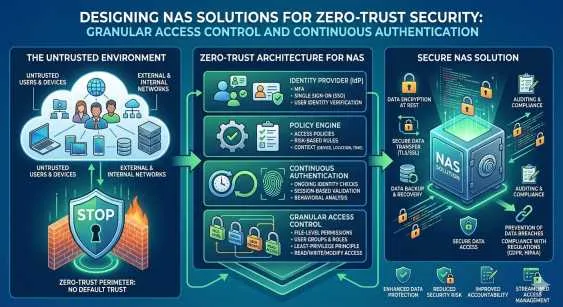
To safeguard your data, setting up user permissions is essential. Control access to certain files or folders, ensuring sensitive information remains secure. Create user accounts and assign permissions based on roles, such as giving read-only access to employees while allowing full control to administrators.
5. Regular Monitoring and Maintenance
After setting up your NAS, don't overlook ongoing maintenance. Regularly check device health, monitor performance, install software updates, and ensure backups are performed. This maintenance is vital for keeping your network storage solution reliable and efficient.
Final Thoughts
Setting up network storage solutions, particularly with NAS, does not have to be intimidating. With a clear understanding of the benefits and essential considerations—along with a straightforward setup process—users can manage their data effectively and enhance collaboration.
By offering streamlined data management, cost-effectiveness, and scalability, NAS is a valuable resource for individuals and businesses alike. As digital requirements evolve, adopting such technologies is crucial for effective data management and security. With this guidance, you're well-prepared to embark on your journey toward a seamless NAS setup and simplified network storage solutions. Embrace the process, and you will witness a transformation in your data storage experience that is both accessible and efficient.




























Sign in to leave a comment.